AI 3D Avatar Generator — from photo to character
Glossy, toy-like 3D portraits with soft studio lighting — eight presets from clean 3D avatars to full gaming characters. Upload a photo or start from text.
3D avatars occupy the sweet spot between realism and playfulness — recognizably you, but rendered like a collectible figure. Our AI 3D avatar generator transforms an uploaded photo into that look: soft lighting, rounded surfaces, expressive eyes. Curious how the underlying technology works? Read how AI avatar generation works for the plain-English version.
Choose from eight 3D presets — a clean 3D avatar, a full 3D character, a studio 3D portrait, a professional look, a gaming-ready render, a futuristic sci-fi style, a fantasy style and a cute toy-like style. Each typically generates in under a minute, and downloads are free PNG files.
What is a 3D avatar generator?
A 3D avatar generator renders your portrait the way modern animation and games do: simulated three-dimensional forms, softly glowing skin tones, gentle global illumination and stylized proportions. The AI reads your photo's geometry and lighting, then rebuilds you as a character that could have stepped out of an animated film.
Unlike flat cartoon styles, 3D renders carry depth — shadows wrap around forms, eyes catch highlights, and hair has volume. That makes them ideal when you want personality without photorealism, and they hold up extremely well as profile pictures on every platform.
- Eight presets: 3D avatar, 3D character, 3D portrait, 3D professional, 3D gaming, futuristic 3D, fantasy 3D and cute 3D
- Depth-aware rendering — soft shadows, glossy highlights, volumetric hair
- Keeps your likeness while smoothing features into character proportions
- Square output that crops cleanly for PFP use everywhere
- Free PNG downloads, no account
- Works from photos; text prompts open the door for fictional characters
Three steps to your 3D avatar
Upload your photo
A clear, front-facing shot gives the model the geometry it needs to build depth.
Select a 3D preset
Avatar, character, portrait, professional, gaming, sci-fi, fantasy or cute — each has its own lighting and material recipe.
Render and download
Generation typically finishes in under a minute; regenerations are free and downloads are free PNG files.
What the 3D styles deliver
True depth
3D-look rendering with shadow, highlight and volume instead of flat color.
Layered materials
Skin, hair and fabric each respond to light the way real materials do.
Studio lighting
Simulated soft lighting flatters every face angle and skin tone.
Gaming-ready preset
Dresses your character for lobbies, rosters and stream overlays.
Fast cloud renders
Finished 3D-style portraits usually arrive in well under a minute.
Free exports
Save your 3D avatar as a free PNG — no account.
3D styles to try
Each preset opens the generator pre-configured for that render style.
3D Avatar
The friendly default: rounded features, soft light, warm palette.
Try this style3D Character
Full character treatment — costume, props and scene energy.
Try this style3D Portrait
A studio-lit bust that flatters while staying playful.
Try this style3D Gaming
Armor, headsets and battle-ready framing for gamer profiles.
Try this style3D Professional Avatar
A crisp, work-friendly 3D render for polished profiles.
Try this styleFuturistic 3D
Neon-lit sci-fi rendering with futuristic tech details.
Try this styleFantasy 3D
Whimsical 3D fantasy character art with a magical atmosphere.
Try this styleCute 3D
An adorable, toy-like 3D render with soft pastel lighting.
Try this styleWhere 3D avatars shine
Gamer profiles
3D gaming avatars read like official character art on Steam, Discord and Xbox.
Brand mascots
A 3D character avatar gives small projects a polished, animated-film feel.
Team pages
Uniform 3D portraits make remote team rosters look cohesive and fun.
Content creators
Thumbnail-ready portraits with depth that pop against flat channel art.
Kids and family
Toy-like 3D renders are a friendly alternative to real photos for children.
Getting the best 3D render
- Front-facing photos render best; the 3D look exaggerates strong profile angles.
- Even lighting on your face helps the model judge depth and shape correctly.
- The 3D portrait preset is the most recognizably you — start there if likeness matters.
- For gaming avatars, mention your game's vibe in a text prompt to steer costume color.
- 3D renders love simple backgrounds; busy rooms compete with the character lighting.
- Regenerate with small photo changes — a head tilt can produce a completely different character.
3D avatar preview
What a 3D-style result looks like
One photo in, one 3D-style AI avatar image out — depth, bold shading and studio lighting, delivered as a high-resolution PNG download.
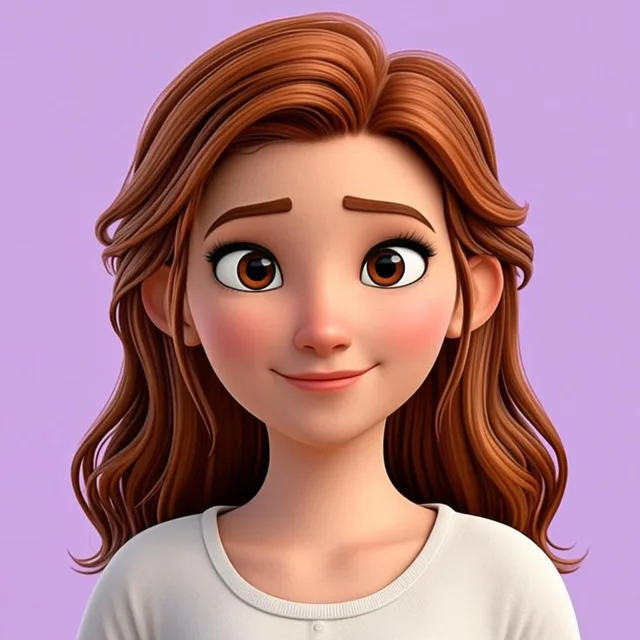
A 3D-style image, not a 3D file
AvatarForge renders your photo as a 3D-style AI avatar image — rounded forms, bold shading and studio lighting that suggest depth — and returns it as one high-resolution PNG download. It is an image, not a downloadable 3D model file.
Every generation is a fresh take: results vary from photo to photo and run to run, while the 3D avatar preview keeps your likeness recognizable. Regenerate as often as you need (fair-use limits apply) — every preset is free.
Frequently asked questions
How does a photo become a 3D-style avatar?
The model analyzes your photo's facial geometry, lighting and features, then re-renders them with 3D conventions — rounded forms, soft shadows, glossy highlights and stylized proportions. The output is a 2D image that looks like a 3D render, preserving your likeness in the process. No modeling skills or software are needed on your end.
Is the 3D avatar generator free to use?
Yes. All eight 3D presets generate free, and regenerations are free too — subject to fair-use rate limits that keep the service available for everyone. Downloads are free PNG files. There is no account or payment step anywhere in the flow — upload, render, download. You can still try every preset on the same photo before choosing a favorite.
Can I get a 3D avatar without uploading a photo?
Yes — open the AI Avatar Generator without a photo and use the optional description field to describe your character: species, costume, color palette, mood. The AI generates a fictional 3D-style avatar image from your chosen preset plus that description. It is an AI-generated image, not a downloadable 3D model file — and it is a popular route for original characters, mascots and anonymous accounts where a real photo should not be used.
Which platforms suit 3D avatars best?
Anywhere a playful, polished look lands well: Discord and gaming networks, YouTube channels, Twitch panels, and team pages. The square output crops cleanly into circular profile slots. For formal contexts like LinkedIn, a professional headshot style is usually the better fit.
Do 3D avatars look good at small sizes?
Very well, actually. The style's bold shapes, high contrast and clean silhouettes survive shrinking to chat sizes far better than photorealistic portraits do. If legibility is critical for your use case, the 3D gaming preset uses the strongest outlines and tightest framing of the eight options.
Keep exploring
Related tools and guides
AI Gaming Avatar Generator
Esports and fantasy presets for competitive profiles.
AI Character Avatar Generator
Build original characters across fantasy, sci-fi and adventure.
AI Avatar from Photo
See all 35 styles you can reach from a single selfie.
How AI avatar generation works
A plain-English tour of the underlying image models.
How it works
The full generation flow, from upload to download.
Render your 3D character now
Upload a photo or type a prompt and watch yourself become a 3D avatar — free, typically in under a minute.
Create 3D avatar